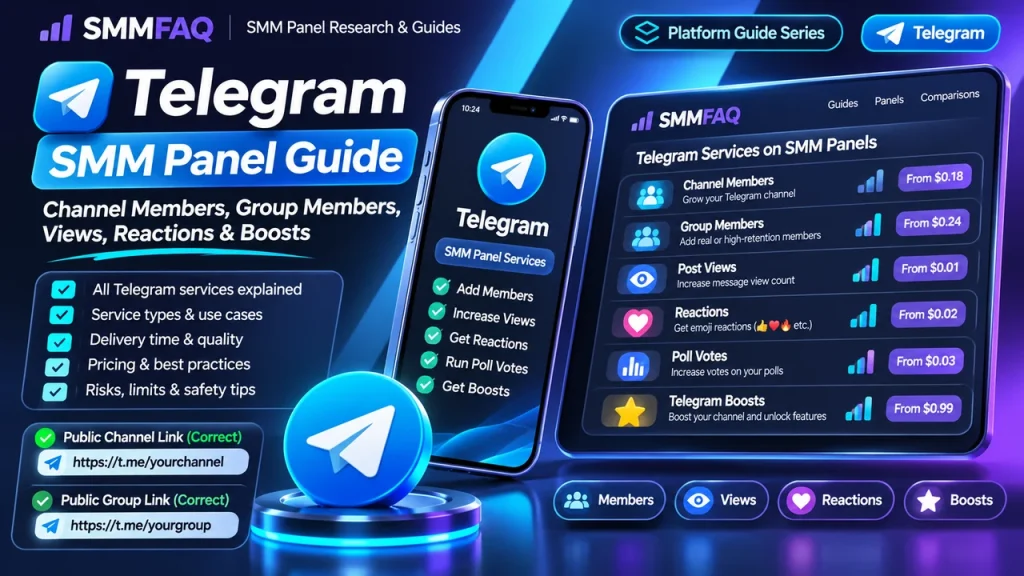
Telegram SMM catalogs look simple until you compare the actual service types. A single category can contain channel subscribers, group members, post views, reactions, poll votes, Premium members, boosts, story views and other specialized products. Each affects a different Telegram object and usually expects a different target format.
What Does a Telegram SMM Panel Actually Sell?
Telegram is structurally different from feed-based platforms. Channels are broadcast spaces, groups are discussion spaces, posts have view and reaction counters, and Premium accounts can support separate features such as boosts. This is why Telegram service catalogs split into several distinct families.
| Service type | What changes | Typical target |
|---|---|---|
| Channel members / subscribers | Channel subscriber count | Public channel link or username |
| Group members | Group participant count | Public group link or supported invite |
| Post views | View counter on a message/post | Public post link |
| Reactions | Emoji reaction count | Public post link |
| Poll votes | Votes on an active poll | Poll/post link |
| Premium members | Member count using Premium-account pool | Channel/group target |
| Boosts | Telegram boost count / feature eligibility | Channel target |
Channel Members vs Group Members
Channels and groups may both display a member count, but their purpose is different. A channel is primarily one-to-many broadcasting. A group is built around conversation. Adding members to a group does not create meaningful discussion, and a large participant count with almost no chat activity can look very different from an active community.
Providers sometimes use one generic “Telegram Members” category for both, but the row description should tell you whether the service expects a channel, group or a specific invite type. If the wrong object is submitted, the provider may reject the order or return Invalid Link.
Public Links, Usernames and Private Invites
A common public format is https://t.me/channelname. Post-level services can require a specific message URL such as https://t.me/channelname/123. Private invitations use different formats and are not universally supported.
Do not assume a private invite will work because it opens in your browser. The upstream provider may only accept public usernames. The Invalid Link troubleshooting guide explains why a browser-valid URL can still be invalid for a particular service.
Telegram Post Views
Post views change the view counter on individual channel messages. Some rows are designed for one post, while others advertise “last posts” or automatic coverage of several recent messages. Read the service description carefully because the order target and counting logic can differ.
Views are not subscribers. A channel can have many members but low recent post views, or modest membership with high views on a viral post. Comparing the two as if they should match exactly leads to bad conclusions.
Reactions
Telegram supports emoji reactions on messages where the channel or group settings allow them. Reaction services usually target one post and one or more reaction types. A reaction order can fail if the selected emoji is not enabled on the message or if the provider expects a different post format.
Reactions are also not comments. They alter a visible emoji counter; written discussion requires a linked discussion group or another comment mechanism.
Poll Votes
Poll-vote services target an active Telegram poll and may require the post URL plus a selected option. They are highly time-sensitive because a closed poll cannot receive new votes. For any vote-like metric, the service description should be read as a technical product definition rather than proof of authentic preference.
Premium Members and Telegram Boosts
Premium-member rows and boosts are separate from ordinary membership. Premium-member products refer to accounts with Telegram Premium status being added for a period or under a particular provider condition. Boosts are tied to Telegram’s own channel-boost feature and can unlock platform capabilities depending on Telegram’s current rules.
A boost package therefore should not be compared with a “1,000 channel members” rate. The unit, duration and expected effect are different.
Start Time, Speed and Duration
Telegram catalogs commonly mix instant-start rows with daily-speed limits. A service marked “Instant” may begin quickly but still deliver over several hours. Premium members or boosts may also be sold for a defined period rather than permanently.
Use the label-decoding guide SMM Panel Service Labels Explained when a row contains shorthand such as R30, ND, 10K/D or Instant.
Refill and Drops
Member services may include no refill, a fixed refill window or a seller-defined “non-drop” claim. These are different things. Refill is a replacement mechanism for eligible losses; non-drop is a quality claim.
The full distinction is covered in What Does Refill Mean in an SMM Panel?.
How to Compare Telegram Services
- Identify channel, group, post or feature-level intent.
- Check the exact target link format.
- Confirm whether the service is members, views, reactions, votes or boosts.
- Read the min/max and start time.
- Check duration if the service is time-based.
- Check refill and cancel support separately.
- Compare price only after matching equivalent product types.
External Market Context
Current public directories show that Telegram catalogs now include much more than basic members and views. SMM Directory, for example, separates subscribers/members, views, reactions, boosts and other Telegram-specific types. Recent competitor guides also distinguish channel members from group members and explain why post metrics should be researched separately.
That breadth is useful for research, but it also increases the chance of choosing the wrong row. The cheapest Telegram service is not necessarily the cheapest version of the metric you actually need.
A Practical Telegram Order Checklist
- Make the required channel/group/post publicly reachable if the service requires it.
- Copy the current target URL instead of an old invitation.
- Confirm the service type before ordering.
- Do not overlap similar member orders on the same target.
- Save the service ID and order ID.
- Check any duration or refill window before assuming permanence.
- Use small tests when the provider or service type is unfamiliar.
For panel discovery, browse the SMMFAQ Panel Directory. Directory inclusion is not a quality endorsement; service-level research still matters.
How a Telegram Order Moves Through an SMM Panel
From the customer side, the order looks simple: choose a service, submit the target and quantity, then watch the status. Behind the panel, the row can be mapped to an upstream provider through an API. The provider validates the channel/group/post target, creates its own external order and returns a status to the reseller.
Because each layer can rename services or normalize statuses differently, the customer-facing order ID does not necessarily reveal the upstream source. This is why SMMFAQ recommends saving the local service ID and date rather than relying only on a service name.
Worked Example
Imagine a public channel has 4,200 subscribers and you are researching a 500-member service. Record the public channel URL, current member count, service ID, refill label and start-time claim. After the order reaches a final status, compare the new count and any later drop separately from post views or reactions.
The purpose of the example is not to recommend a quantity. It shows which fields should be recorded so the result can be audited later: target, quantity, service ID, start time, visible baseline, final status and any duration/refill terms.
Common Failure Modes
- Private or unsupported invite link
- Wrong object: group service used on a channel or post service used on a profile
- Provider rejects the public username format
- Channel or group changes username during processing
- Member pool loses accounts and count drops
- A poll closes before a vote order finishes
A failed or Partial order does not automatically mean the panel is fraudulent. It can reflect target validation, upstream capacity, platform changes or a service-specific rule. Repeated failures across unrelated categories are more significant than one isolated order.
How to Compare Two Services Without Comparing Apples to Oranges
- Channel vs group eligibility
- Member vs view vs reaction metric
- Public vs private link requirement
- Refill period
- Start time and daily speed
- Premium/boost duration where applicable
Price becomes meaningful only after those fields match. A cheaper listing can be a different product—shorter duration, no refill, different targeting, smaller maximum or a different traffic/account source.
What Panel Operators and Resellers Should Monitor
For Telegram, store whether the row is channel members, group members, post views, reactions, votes or boosts. Mapping all of them to a generic ‘Telegram’ category makes support and automatic routing much harder.
For operators using provider APIs, an automatic sync should not blindly publish every upstream row. High-risk or time-sensitive service types benefit from manual descriptions that explain target format, duration and customer-side restrictions.
What the Visible Metric Does Not Prove
A higher subscriber count does not prove post readership; more views do not prove subscribers; reactions do not prove discussion; boosts do not equal members. Each metric should be interpreted on its own.
This is the central research distinction between a metric and an outcome. A visible counter can be measured; authenticity, intent, conversion and long-term business value require different evidence.
Post-Order Audit
- Save the final status and timestamp.
- Compare the visible metric with the pre-order baseline.
- Check whether any promised duration/refill window is still active.
- Record unexpected drops or removals.
- Do not start an overlapping replacement order until the first order is final.
- If support is needed, send exact order data rather than a vague complaint.
Research Framework for Telegram Services
Telegram catalogs are unusually multi-dimensional: channel members, group members, views, reactions, poll votes, Premium accounts and boosts can sit under one menu while using different targets and units. A research table should not collapse them into a single ‘Telegram price.’
A useful SMMFAQ comparison separates what is directly observable from what is only claimed. Observable fields include the published rate, minimum, maximum, visible service type, refill/cancel flags and the time the row was captured. Claims such as “real,” “premium,” “stable,” or “best quality” require additional evidence and should be stored as labels rather than facts.
1. Normalize the Unit Before Comparing Price
Normalize members per 1,000, views per 1,000, reactions per 1,000, and boosts by the actual package/duration offered. A boost package or Premium-member duration cannot be converted cleanly into an ordinary member rate without losing important context.
This normalization is important for search users as well as resellers. A Google result that says one panel is ‘cheapest’ can be misleading when the products use different units, duration or scope. SMMFAQ therefore prefers comparable service definitions over headline floor prices.
2. Separate Quality Claims From Remedy Terms
Member rows often mix refill and non-drop language. Views and reactions may not have meaningful long-term refill behavior in the same way. Boosts are duration/feature products. Apply quality and remedy terminology to the metric where it actually makes sense.
A refill window is measurable as a policy field. A quality label is descriptive. They can appear together, but neither should silently substitute for the other. If a provider advertises both, record both.
3. Treat Timing as Part of the Product
Post-view and reaction orders depend on an active public post; poll votes depend on an open poll; member services can run longer. The useful time window is therefore metric-specific.
For time-sensitive metrics, the start-time claim can be more important than the maximum throughput. For long-running follower/member products, later retention or refill may matter more. This is why one generic ‘speed’ score is usually too simplistic.
4. Save Evidence for Support
For Telegram issues, save the exact t.me target, whether it was public/private, the message number for post services, and the service name. Username changes and invite changes can make later reproduction difficult.
Good troubleshooting is data-driven. A support ticket containing service ID, order ID, target, pre-order baseline, relevant timestamps and screenshots is much easier to investigate than a message that only says “not working.”
5. Compare the Service With the Wider Panel Context
A single good or bad row does not describe an entire panel. Use the SMMFAQ Panel Directory and other SMMFAQ research pages to compare provider behavior, catalog changes and panel availability before drawing panel-wide conclusions.
Frequently Asked Questions
Are Telegram channel members and group members the same service?
Not necessarily. Both increase a member/subscriber count, but channels and groups behave differently and some providers use different service rows or link rules for each.
What link do Telegram member services usually need?
Many catalog rows expect a public t.me channel or group link. Private invite links may be unsupported unless the service explicitly says they are accepted.
What is the difference between Telegram views and members?
Members change the channel or group participant count. Views change the counter on one or more posts. They are separate metrics and should not be compared as if they were the same product.
What are Telegram boosts?
Boosts are a separate Telegram feature associated with Premium accounts and channel capabilities. They do not simply add ordinary subscribers.
Do Telegram reaction services add comments?
No. Reactions increase emoji reaction counts on eligible posts. Written comments are a different service type.