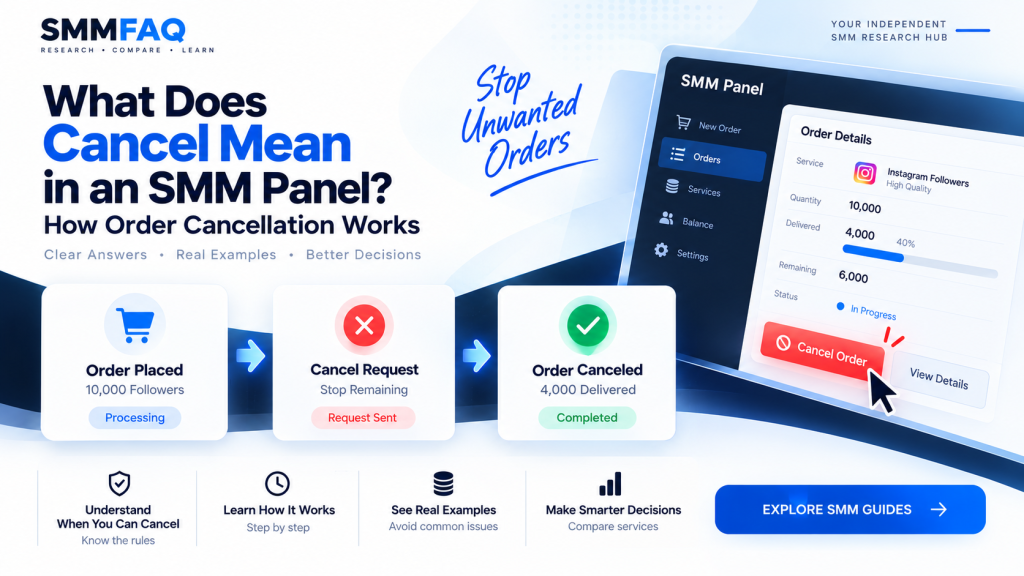
Cancel in an SMM panel means that an eligible order may be submitted to stop further processing before the full requested quantity is delivered.
It does not necessarily mean that every order can be canceled instantly.
For example, suppose an order was placed for 10,000 followers.
The provider has already delivered 4,000 when a cancellation request is accepted.
A simplified result could look like this:
Order quantity: 10,000
Delivered: 4,000
Remaining: 6,000
Final status: Canceled
The completed 4,000 generally remains delivered, while the undelivered portion stops processing.
How the remaining amount is handled financially depends on the provider and panel software.
A Cancel: Yes label therefore means cancellation functionality may be available for that service. It should not be interpreted as a guarantee that every order can always be stopped.
If you are still learning the basic terminology, start with What Is an SMM Panel? before continuing.
What Does Cancel Mean in an SMM Panel?
In an SMM panel, cancellation usually means asking the provider to stop the undelivered portion of an active order.
The feature is commonly associated with services marked as:
Cancel: Yesor:
Cancel EnabledA service without cancellation functionality may instead show:
Cancel: NoThe difference is important because some services continue processing until they reach a final status even if the customer no longer wants the order.
Cancel-enabled services provide another possible order-management option.
Does Cancel Mean the Entire Order Is Removed?
Usually no.
Cancellation normally affects the remaining portion of an order rather than reversing quantity already delivered.
For example:
Ordered: 20,000
Delivered before cancellation: 7,500
Remaining: 12,500
If the order is successfully canceled, the 7,500 already delivered would generally not disappear simply because the remaining delivery stopped.
The final order may show something similar to:
Status: Canceled
Start count: 25,000
Delivered: 7,500
Remains: 12,500
Exact fields vary between providers.
When Can an SMM Order Be Canceled?
The answer depends on the service and provider.
Cancellation may be possible when:
- the service supports cancel requests,
- the order has not finished,
- there is still quantity remaining,
- the provider has not passed a point where cancellation is technically unavailable,
- and the order is in an eligible status.
For example, an order still marked Pending may be easier to cancel than one that has already processed 95% of its quantity.
However, this is not a universal rule.
The provider controls the actual cancellation logic.
What Is a Cancel-Enabled SMM Service?
A cancel-enabled service is a service for which the provider exposes some method of requesting cancellation.
That method may be available through:
- a customer button,
- an administrator action,
- a provider API,
- or a support process.
A panel connected to an upstream provider can sometimes pass the request automatically.
This is similar to the automation used for orders, status checks and refill requests.
For a broader explanation of this system, see What Is an SMM Panel API?.
How Does an SMM Panel Cancel Request Work?
A simplified workflow looks like this:
Customer requests cancellation
↓
Panel checks the order
↓
Panel identifies the upstream provider order
↓
Cancellation request is submitted
↓
Provider reviews/processes the request
↓
Order becomes canceled or request is rejected
The process can happen automatically or manually depending on the panel.
A customer may see only one Cancel button even though several systems communicate behind the scenes.
What Is a Cancel API?
A cancel API lets a panel submit eligible cancellation requests programmatically.
For example:
Local order ID: 182900
Provider order ID: 7744011
The customer interacts with order 182900.
But the reseller’s system knows that the upstream provider is tracking the order as 7744011.
When the customer presses Cancel, the panel could submit the upstream order ID through the provider API.
A response may indicate that the request was:
Acceptedor:
Not eligible for cancellationThe wording and behavior vary by provider.
Does Clicking Cancel Immediately Stop an Order?
Not necessarily.
This is one of the most important distinctions.
A cancel button can submit a request.
The provider still has to process that request.
During that time, the underlying service may continue delivering.
For example:
Cancel clicked at:
3,500 delivered

Provider processes cancel at:
4,100 delivered
The final delivered amount could therefore be higher than the quantity visible at the moment the customer pressed the button.
This does not necessarily mean the cancel system failed.
There may simply have been a delay between submission and processing.
What Order Statuses Can Be Canceled?
Status terminology differs across providers, but common SMM order statuses include:
- Pending
- Processing
- In Progress
- Completed
- Partial
- Canceled
A Completed order normally has nothing left to cancel.
A Canceled order has already reached that final state.
Pending or active orders are more likely to be relevant for cancellation, but the provider’s rules determine actual eligibility.
Can a Completed SMM Order Be Canceled?
Normally no.
Once an order is fully completed, there is no remaining quantity to stop.
For example:
Order: 10,000
Delivered: 10,000
Remains: 0
Status: Completed
At this stage, cancellation would not normally apply.
If the issue concerns a later drop, that is a different concept.
An eligible service may instead use the refill process described in What Does Refill Mean in an SMM Panel?.
Cancel vs Refill: What Is the Difference?
These are two different order-management features.
Cancel
Used to stop an unfinished order.
Refill
Used to replace eligible quantity that drops after delivery.
A simplified comparison:
| Feature | Cancel | Refill |
|---|---|---|
| Stops remaining delivery | Yes | No |
| Usually used before completion | Yes | No |
| Replaces later drops | No | Yes |
| Can depend on provider eligibility | Yes | Yes |
| May be API automated | Yes | Yes |
A service can support both features.
It can also support one but not the other.
Cancel vs Partial: Are They the Same?
No.
A canceled order is generally stopped through a cancellation process.
A partial order usually means the provider could not deliver the full requested quantity.
Example of cancellation:
Ordered: 10,000
Delivered: 3,000
Customer/provider cancels remaining: 7,000
Status: Canceled
Example of partial:
Ordered: 10,000
Provider delivers: 7,000
Provider cannot complete: 3,000
Status: Partial
The final quantities may look similar, but the reason the order ended is different.
What Happens to the Remaining Quantity After Cancellation?
The undelivered portion normally stops.
Suppose an order contains:
Quantity: 25,000
Delivered: 10,000
Remaining: 15,000
After successful cancellation:
Delivered: 10,000
Remaining: 15,000
Status: Canceled
The 15,000 remaining units should no longer be expected to continue normally.
However, because providers can process requests asynchronously, a small amount of additional delivery can sometimes occur during the cancellation process.
What Happens to the Money After an Order Is Canceled?
This depends on the panel’s accounting system.
Many systems calculate the final charge based on the delivered quantity and adjust the undelivered portion.
Imagine:
Order value: $10.00
50% delivered
50% canceled
A system may retain the cost of the delivered portion and restore the undelivered value to the customer’s panel balance.
But this is not a universal rule.
Providers and panels can implement cancellation accounting differently.
Users should therefore check the panel’s current terms rather than assuming every cancel-enabled service uses the same refund calculation.
Is Cancellation the Same as a Refund?
No.
Cancellation is an order-status process.
A refund is a financial process.
An order can be canceled while the financial adjustment is handled separately.
For example:
Order:
Canceled

Delivered portion:
Charged

Undelivered portion:
Returned to panel balance
The precise method depends on the panel.
This distinction matters because the word cancel alone does not define where or how money is returned.
Why Can an SMM Cancellation Request Fail?
Several situations can make an order ineligible.
The Service Does Not Support Cancellation
The most obvious reason is:
Cancel: NoIf the provider does not expose a cancellation mechanism, the panel may have no way to stop the order automatically.
The Order Already Completed
There is no remaining quantity to stop.
The Order Is Too Far Into Processing
Some providers may no longer allow cancellation once a certain processing stage has been reached.
Another Cancellation Is Already Pending
Submitting the request repeatedly may not create a new action.
The Provider Disabled Cancellation
Service functionality can change.
A service that supported cancellation yesterday may not necessarily retain the same behavior forever.
Provider API Error
The upstream provider may be temporarily unavailable or return an error.
Can a Pending Order Be Canceled?
Sometimes.
A pending order may not yet have started delivery, making cancellation logically easier.
But Pending does not automatically guarantee cancellation.
The provider may already have queued the request internally.
Therefore, the service still needs to support cancellation.
Can an In-Progress Order Be Canceled?
Possibly.
This is one of the main uses of cancel-enabled services.
Suppose:
Quantity: 100,000
Delivered: 18,000
Status: In Progress
If cancellation is available and accepted, the provider may stop before delivering the remaining 82,000.
But the exact final amount depends on when the cancellation takes effect.
Why Might Delivery Continue After a Cancel Request?
Because the process is not always instantaneous.
An SMM order may already be:
- queued,
- distributed across workers,
- being processed by another upstream source,
- or actively delivering.
It may take time for the cancellation instruction to propagate through the system.
This can be particularly relevant when more than one provider or reseller exists in the supply chain.
For a deeper explanation of these relationships, see What Is an SMM Panel Provider?.
Can a Reseller Cancel an Upstream Provider Order?
Yes, if the upstream service supports cancellation.
The reseller can map its local order to the provider order.
For example:
Customer order:
#10452

Upstream provider order:
#8800132
The reseller system sends the cancel request for provider order 8800132.
The customer never needs to know the upstream order number.
This is one of the ways API automation lets reseller panels manage provider services behind their own interface.
Does Cancel Support Affect the Price?
It can be one factor, but there is no universal pricing rule.
Consider two services:
Service A
$0.45 / 1K
Cancel: No
Service B
$0.59 / 1K
Cancel: YesThe cancellation feature is one difference.
But there may also be differences in:
- provider,
- refill,
- source,
- maximum quantity,
- delivery,
- targeting,
- and markup.
So the additional $0.14 cannot automatically be attributed only to cancellation.
For a deeper explanation of pricing variables, see Why Do SMM Panel Prices Differ?.
Is a Cancel-Enabled Service Better?
Not automatically.
Cancel support is useful because it provides another way to manage an order.
But it does not independently prove:
- higher quality,
- better retention,
- faster delivery,
- better accounts,
- safer delivery,
- or a better provider.
It is simply one observable feature.
This is why SMMFAQ displays cancel separately from other service data.
Is Cancel Support Useful for Large Orders?
It can be.
Suppose a customer places a large order and notices that delivery is no longer needed.
With a non-cancelable service, the remaining order may continue.
A cancel-enabled service can potentially reduce the amount still processed.
This can make the feature operationally useful for services with large maximum quantities.
But cancellation still depends on eligibility and provider response time.
Can You Cancel an Order Because You Entered the Wrong Link?
Possibly, but you should not assume so.
If the service supports cancellation and the request is accepted quickly enough, some remaining delivery may be stopped.
However, quantity already sent to the incorrect target generally cannot be reversed simply through the cancellation mechanism.
This is why the link should be checked carefully before submitting an order.
Can You Change the Link Instead of Canceling?
Usually not.
Most SMM orders are created against the target provided at order submission.
Once processing starts, changing:
instagram.com/account-ato:
instagram.com/account-bis normally not the same operation as cancellation.
A provider may require the original order to end and a new order to be placed.
Order-edit functionality varies and should not be assumed.
Can You Change the Quantity After Ordering?
Usually not through ordinary cancellation.
Cancellation stops the remaining amount.
It does not generally edit the original quantity field.
For example:
Original:
100,000

Wanted after ordering:
25,000
If cancellation is accepted around 25,000 delivered, the final result may end near that amount.
But there is no guarantee that the provider will stop at exactly 25,000.
Why Is the Final Delivered Amount Different From the Amount at Cancellation?
This usually comes down to timing.
Imagine the customer sees:
Delivered: 12,200and immediately clicks Cancel.
The provider processes the request several minutes later at:
Delivered: 13,050The final result could be approximately 13,050 rather than 12,200.
A cancel request is therefore better understood as:
Stop further processing as soon as the provider can accept and apply the cancellation.
It is not necessarily a command to freeze the exact current number instantly.
Can a Canceled Order Be Restarted?
Usually not as the same order.
Once an order reaches a final Canceled status, a customer who wants more quantity may need to place a new order.
The panel may create a completely new order ID.
Providers can implement exceptions, but a canceled order should normally be considered final.
Can a Canceled Order Be Refilled?
This depends on the service and provider.
There may be two different quantities involved:
Delivered before cancellation
Undelivered quantity
Cancellation concerns the undelivered portion.
If the quantity that was actually delivered later drops, the refill rules for that delivered portion may or may not apply.
A service would need relevant refill support.
See What Does Refill Mean in an SMM Panel? for how refill eligibility works.
What Does Cancel: No Mean?
Cancel: No means the service catalog does not indicate ordinary cancellation support.
Once an order is placed, users should be prepared for it to continue according to the service’s normal processing flow.
This makes it especially important to check:
- the target link,
- quantity,
- service ID,
- and service description
before placing the order.
What Does Cancel: Yes Mean?
Cancel: Yes means the service supports some form of eligible cancellation request.
It does not necessarily mean:
Guaranteed instant cancellationA more accurate interpretation is:
Cancellation functionality is available subject to provider conditions.That distinction prevents unrealistic expectations.
Can Cancel Support Change?
Yes.
Provider catalogs are dynamic.
A service could be:
Cancel: Yesduring one synchronization and later become:
Cancel: NoThe provider could also replace or remove the service.
This is why the date of service data matters.
SMMFAQ treats catalog fields as time-sensitive rather than permanent product specifications.
How Should You Compare Cancel-Enabled Services?
Cancellation should be considered alongside other fields.
Price
What is the rate per 1,000?
Provider
Who supplies the service?
Minimum
What is the smallest order?
Maximum
How much can be ordered at once?
Refill
Does the service include refill support?
Cancel
Can eligible active orders be stopped?
Updated
How current is the synchronized information?
You can compare these fields directly in the SMMFAQ Services Database.
Example: Comparing Three Services
Imagine three similar services:
| Field | Service A | Service B | Service C |
|---|---|---|---|
| Price / 1K | $0.39 | $0.57 | $0.81 |
| Min | 100 | 100 | 50 |
| Max | 10K | 250K | 1M |
| Refill | No | Yes | Yes |
| Cancel | No | Yes | Yes |
Service A is the cheapest.
Service C has the largest maximum.
B and C support cancellation.
This table does not establish one universal winner.
It simply reveals different service characteristics.
The appropriate field depends on what the researcher is trying to compare.
How SMMFAQ Displays Cancel Information
Where provider service data contains cancellation support, SMMFAQ exposes it as a separate field.
The full service database can therefore be used to compare:
Provider
Service ID
Service
Category
Price / 1K
Min / Max
Refill
Cancel
Updated
This is intentional.
A service should not be described only by its price.
A $0.40 listing and a $0.60 listing may have different limits, refill options or cancellation capabilities.
Browse the current comparison interface in the SMMFAQ Services Database.
For broader information about the companies supplying those catalogs, use the SMMFAQ Provider Directory.
Final Thoughts
Cancel in an SMM panel is a mechanism for stopping the undelivered portion of an eligible active order.
It is useful, but it has limitations.
A successful cancellation can depend on:
- service support,
- order status,
- remaining quantity,
- provider processing,
- API availability,
- and how quickly the request is applied.
The most important distinction is this:
Cancel: Yes means cancellation is supported. It does not mean every order can be stopped instantly at any point.
Users should also remember that cancellation and refund are separate concepts.
The order status controls whether delivery continues.
The panel’s financial system determines how any undelivered amount is credited or adjusted.
When researching services, compare cancellation together with price, refill, min/max limits, provider information and update time.
You can do this in the SMMFAQ Services Database and review provider context through the Provider Research Directory.
Frequently Asked Questions
What does cancel mean in an SMM panel?
Cancel means an eligible active order may be submitted to stop further delivery before the full requested quantity has been processed.
Does clicking Cancel stop an SMM order instantly?
Not always. The request may take time to reach and be processed by the provider, so some additional delivery can occur before cancellation takes effect.
Can a completed SMM order be canceled?
Normally no. A completed order has no remaining quantity to stop.
What does Cancel: Yes mean?
It means the service supports some form of eligible cancellation request. It does not guarantee instant cancellation for every order.
What does Cancel: No mean?
It means ordinary cancellation functionality is not listed for the service.
Do I get a refund when an SMM order is canceled?
That depends on the panel’s accounting rules. Many systems adjust the undelivered portion, but cancellation and financial refunds are separate processes.
What is the difference between cancel and refill?
Cancel stops remaining delivery on an active order. Refill replaces eligible quantity that drops after delivery.
What is the difference between canceled and partial?
Canceled generally means an order was stopped through a cancellation process. Partial means the provider could not complete the full requested quantity.
Can an in-progress order be canceled?
Sometimes, if the service supports cancellation and the provider still considers the order eligible.
Where can I compare services with cancel support?
You can compare Cancel, Refill, Price, Min/Max, Provider and Updated fields in the SMMFAQ Services Database.