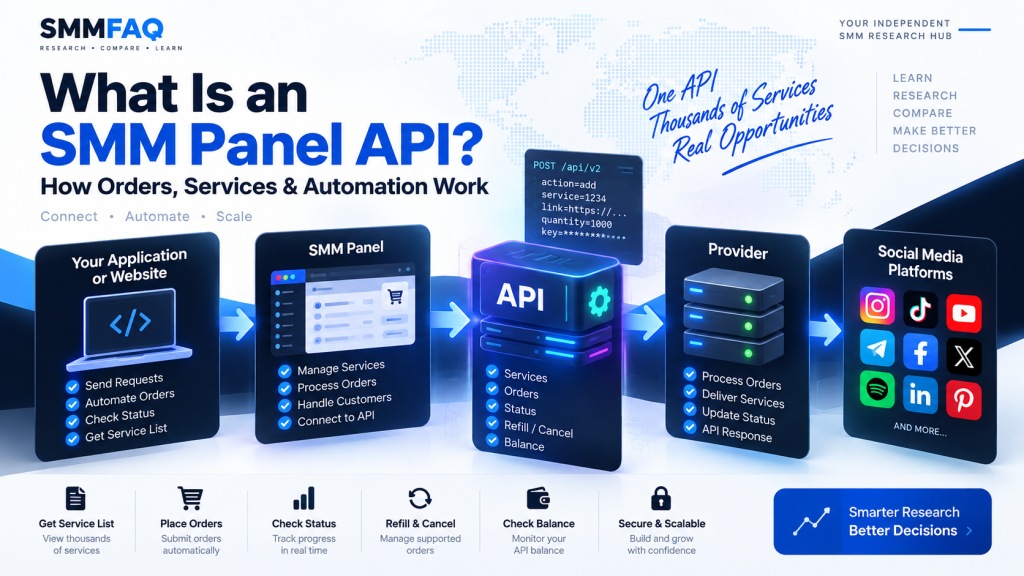
An SMM panel API is a connection that allows software, websites, or other SMM panels to communicate with a service provider automatically.
Instead of logging into a website and placing every order manually, an API client can request a service list, submit orders, check their status, request refills where supported, and read account balance information programmatically.
This is one of the main reasons an SMM panel can manage thousands of services without processing every order by hand.
A simplified workflow looks like this:
Customer → SMM Panel → Provider API → Service
But in practice, there can be more than one provider or reseller involved in the chain.
If you are new to the industry, it helps to first understand what an SMM panel is and how SMM panel providers work.
What Is an API in an SMM Panel?
API stands for Application Programming Interface.
In simple terms, it is a structured way for one system to send instructions to another system and receive a response.
For an SMM panel, that might mean:
- requesting the current service catalog,
- creating a new order,
- checking an existing order,
- requesting a refill,
- cancelling an eligible order,
- or checking the available account balance.
The user does not need to see this process.
A customer can place an order through the panel’s normal website while the panel handles the API communication in the background.
How Does an SMM Panel API Work?
Most SMM APIs use a request-and-response model.
A panel sends data to a provider endpoint.
That request usually contains an API key, an action, and the information required for that action.
For example, a new order request may contain:
API Key
Action: add
Service ID
Link
Quantity
The provider receives the request, validates it, and returns a response.
A successful response might contain an order ID:
{
  "order": 123456
}
That order ID can then be used to check the order status later.
The exact field names and response structures can vary between providers.
What Is an SMM API Endpoint?
An API endpoint is the address that receives API requests.
Many SMM panels use a URL similar to:
https://example.com/api/v2The API client sends requests to that endpoint using parameters that describe what it wants to do.
For example:
action=servicesmay request the provider’s current catalog.
Another request such as:
action=status
order=123456
may request information about a specific order.
The important point is that the endpoint is only the communication address.
The API key determines which account is making the request.
What Is an SMM Panel API Key?
An API key is a private credential used to identify and authorize an API account.
It should normally be treated like a password.
Anyone who obtains a valid API key may potentially be able to perform actions allowed by that API account.
That can include placing orders using the account balance.
For this reason, an API key should not be published in:
- screenshots,
- public source code,
- forum posts,
- public GitHub repositories,
- browser-side JavaScript,
- or support messages where it is not required.
A panel-to-provider API connection should normally be handled server-side.
What Can an SMM Panel API Do?
The available functions depend on the provider, but several operations are common across the industry.
Retrieve Services
A service request returns the provider’s current service catalog.
A response may contain information such as:
| Field | Meaning |
|---|---|
| Service | Unique service ID |
| Name | Service name |
| Type | Order/service type |
| Category | Category name |
| Rate | Price per 1,000 |
| Min | Minimum order quantity |
| Max | Maximum order quantity |
| Refill | Whether refill is available |
| Cancel | Whether cancellation is supported |
A reseller panel can use this data to create or update its own service list.
Create an Order
After selecting a service, the API client can submit a new order.
A basic order request may require:
service
link
quantity
Some service types need additional fields.
For example, a custom comment service could require comment text.
A package service might use different parameters.
A subscription-type service could require post counts or timing information.
So an API integration should not assume every service uses exactly the same request structure.
Check Order Status
Once an order exists, the panel usually needs to know what is happening to it.
A status response may contain values such as:
- Pending
- Processing
- In progress
- Completed
- Partial
- Canceled
It may also include information such as:
start_count
remains
charge
currency
Not every provider returns every field.
Status terminology can also differ between platforms.
What Does “Remains” Mean?
Remains usually represents the portion of the order that has not yet been delivered.
Suppose an order is for:
10,000 followersand 7,500 have been processed.
A provider may return:
remains: 2500Once the service is fully completed, remains may become zero.
For partial orders, the final remains value can represent the quantity that was not delivered.
What Is Start Count?
Start count is the number detected at the beginning of an order.
For example, if an Instagram account had:
15,200 followerswhen an order started, the API could record 15,200 as the start count.
This value can help panels track delivery.
However, social media counts can naturally change during an order.
A user may gain or lose followers independently of the service.
For this reason, start count is useful operational data but does not always provide a perfect measurement of what caused every count change.
What Is a Partial Order?
A partial status generally means that a provider was unable to deliver the full requested quantity.
For example:
Ordered: 10,000
Delivered: 7,000
Undelivered: 3,000
The remaining portion may be returned according to the provider’s billing logic.
A reseller panel then needs to synchronize that result with the customer’s order.
How the financial adjustment is represented depends on the panel software and provider API.
How Does an SMM Panel Get Its Service List?
A panel connected to a provider can periodically request the provider’s service catalog.
The panel may then:
- read the provider services,
- match them with its own database,
- update rates,
- update min/max limits,
- detect removed services,
- add new services,
- apply its own markup,
- and display selected services to customers.
This does not necessarily happen in real time.
Some panels synchronize provider information every few minutes, every few hours, manually, or according to their own update schedule.
That means a reseller’s displayed price can temporarily differ from the upstream provider’s latest rate.
Does an SMM API Automatically Change Prices?
It can, but this depends on how the panel software is configured.
A provider may change a service price from:
$0.50 / 1Kto:
$0.65 / 1KThe reseller panel must detect that change and decide what to do with it.
Some systems automatically recalculate the customer-facing rate.
Others require manual approval.
A panel may also apply a percentage markup.
For example:
Provider rate: $1.00
Markup: 20%
Customer rate: $1.20
But pricing strategies vary widely.
Can an SMM Panel Connect to Multiple APIs?
Yes.
A panel can connect to many providers at the same time.
For example:
Provider A
- Instagram followers
- Instagram likes
Provider B
- TikTok services
Provider C
- YouTube services
Provider D
- Telegram services
A larger panel may use many more sources.
This is why an SMM panel can offer thousands of services without obtaining all of them from one provider.
The provider research section on SMMFAQ is designed to help organize this type of information.
Can Two SMM Panels Use the Same API Provider?
Yes.
This happens frequently in reseller-based systems.
Imagine Provider A offers a service for:
$0.40 / 1KPanel B might sell it for:
$0.55 / 1KPanel C might sell the same upstream service for:
$0.80 / 1KFrom a customer perspective, these appear to be three different listings.
But orders may ultimately be routed to the same provider.
This is also one reason why comparing only service names is unreliable.
Panels can rename imported services.
Does the Same Service ID Mean the Same Provider?
Not necessarily.
Service IDs are generally internal to each panel.
For example:
Provider A:
Service ID 100

Reseller B:
Service ID 4821
The reseller’s service 4821 could still point to Provider A’s service 100.
The reseller software only needs to store the relationship internally.
So comparing IDs across unrelated panels does not prove that services are different.
Likewise, matching IDs do not automatically prove they share the same source.
What Is API Service Mapping?
Service mapping connects a reseller’s service with the corresponding upstream provider service.
For example:
Local Service ID: 5001
Provider: Provider A
Provider Service ID: 738
When a customer orders local service 5001, the panel knows to send the request to service 738 on Provider A.
This relationship can be changed.
A panel could later remap service 5001 to another provider without changing the customer-facing service ID.
That allows panel operators to replace a supplier when conditions change.
Why Would a Panel Change API Providers?
There are many operational reasons.
A service may become:
- slower,
- more expensive,
- unavailable,
- unstable,
- limited,
- or no longer suitable for the panel’s requirements.
A panel can then switch to another upstream service.
Provider changes can also occur because:
- refill conditions changed,
- maximum limits were reduced,
- delivery quality changed,
- another provider added a comparable service,
- or the upstream service disappeared.
This is one reason SMM service catalogs change regularly.
What Is a Refill API?
Some providers support refill requests through their API.
A reseller can send an eligible order ID to the provider without manually opening a support ticket.
A simplified flow might be:
Customer requests refill
↓
Panel verifies order
↓
Panel sends refill API request
↓
Provider accepts or rejects request
↓
Panel updates customer
An API supporting refill automation can reduce manual work.
But a service being marked as refill-enabled does not mean every drop will always qualify.
Providers can apply specific refill conditions.
What Is a Cancel API?
A cancel API allows eligible orders to be submitted for cancellation automatically.
Not all services support cancellation.
Even if a service supports it, an order may no longer be cancellable after processing has progressed too far.
A panel should therefore treat Cancel: Yes as a capability rather than a guarantee that every order can be stopped at any moment.
How Does Balance Work Through an SMM API?
Providers commonly expose a balance request.
A response might look similar to:
{
  "balance": "248.75",
  "currency": "USD"
}
A reseller can use this to monitor whether enough provider balance is available to continue processing orders.
Large panels may monitor balances across multiple providers.
If an upstream account runs out of balance, new automatic orders can fail even when the customer has sufficient balance on the reseller panel.
These are two different account balances.
Provider Balance vs Customer Balance
This distinction is important.
Suppose a customer has:
$100on Panel B.
Panel B might have only:
$2remaining at its upstream provider.
The customer’s balance does not automatically fund the upstream API account in real time.
The panel operator must maintain sufficient provider balances.
This is one of the operational responsibilities of running a reseller panel.
Does Having an API Make a Panel a Main Provider?
No.
An API proves that a platform allows programmatic communication.
It does not prove that the company owns or directly operates the underlying social media service.
A reseller can have:
- a full API,
- thousands of services,
- automated refill,
- automated status updates,
- and many API customers.
Its own orders could still be forwarded to another provider.
Therefore:
API provider and original service source are not necessarily the same thing.
This is an important distinction when researching SMM panel supply chains.
How SMMFAQ Uses Service API Data
SMMFAQ’s service research system is designed around synchronized service catalogs.
Rather than calling provider APIs every time a visitor performs a search, service data can be synchronized and stored locally.
Visitors can then search the SMMFAQ database by fields such as:
- provider,
- service name,
- category,
- price,
- minimum quantity,
- maximum quantity,
- refill,
- cancel,
- and update information.
This approach allows the comparison interface to remain separate from the provider’s live API request process.
Explore the current comparison structure in the SMM Services Database.
What Should You Check Before Using an SMM API?
For panel operators and API users, several details matter.
API Documentation
The provider should explain:
- endpoint,
- required parameters,
- actions,
- response format,
- supported order types,
- and error handling.
Service IDs
Service IDs may change or disappear.
Automation should be able to handle unavailable services.
Pricing
Provider rates can change.
A reseller using automatic pricing should account for these changes.
Order Types
Not all services accept only a link and quantity.
Custom comments, subscriptions, mentions, packages, polls, and other services may require different fields.
Status Handling
The system should correctly process statuses such as partial and canceled rather than assuming every order ends as completed.
Refill and Cancel Support
These functions should only be shown when the upstream service actually supports them.
API Security
API keys should remain private and should not be exposed to customer browsers.
Common SMM API Errors
API integrations can fail for many reasons.
Examples include:
Invalid API key
The authentication key is incorrect or inactive.
Insufficient funds
The upstream provider account does not have enough balance.
Invalid service
The requested service ID does not exist or is no longer active.
Quantity too low
The order is below the service minimum.
Quantity too high
The quantity exceeds the maximum.
Invalid link
The target URL or username does not match the service requirements.
Service unavailable
The service may be temporarily disabled.
The exact wording depends on the provider.
A good integration should record the provider response rather than simply returning a generic error.
Is an SMM API Real-Time?
Not always.
Placing an order can happen almost instantly at the API level, but that does not mean the social media service itself starts or finishes immediately.
There are several separate stages:
API request submitted
↓
Provider accepts order
↓
Order enters queue
↓
Service begins
↓
Delivery progresses
↓
Order reaches final status
The API automates communication.
It does not remove the operational characteristics of the underlying service.
SMM API vs Manual Ordering
The main difference is automation.
Manual Ordering
A user:
- logs into the provider,
- selects a service,
- enters the link,
- enters the quantity,
- submits the order,
- checks the status manually.
API Ordering
Software performs those steps automatically.
For a panel handling many orders, API automation is much more practical.
It also allows customers of one panel to indirectly use services supplied by another platform without interacting with that provider themselves.
Final Thoughts
An SMM panel API is the communication layer that allows panels, resellers, providers, and software systems to exchange service and order information automatically.
It can handle tasks such as:
- retrieving services,
- creating orders,
- checking status,
- reading balance,
- requesting refill,
- and requesting cancellation where supported.
But an API should not be confused with service ownership.
A panel can operate a sophisticated API while sourcing some or all of its services from other providers.
For research purposes, it is useful to separate three questions:
Who operates the customer-facing panel?
Which provider receives the API order?
Where does the underlying service ultimately originate?
Those answers are not always the same.
You can continue with the SMMFAQ Provider Research directory or compare synchronized service information in the SMMFAQ Services Database.
Frequently Asked Questions
What is an SMM panel API?
An SMM panel API allows software or another panel to retrieve services, place orders, check order status, read account balance, and perform other supported actions automatically.
What does API v2 mean in an SMM panel?
API v2 commonly refers to a request format used by many SMM panel systems for actions such as services, add, status, balance, refill, and cancel. Individual implementations can still differ.
Do I need an API to use an SMM panel?
No. Regular customers can usually place orders through the panel website. APIs are mainly useful for automation, resellers, applications, and high-volume workflows.
Can a reseller have its own SMM API?
Yes. A reseller can provide an API to its customers while forwarding those orders to another upstream provider API.
Does an API prove that a panel owns its services?
No. API availability proves that a panel supports automated communication. It does not prove that the panel is the original source of every service.
Can one panel connect to multiple SMM APIs?
Yes. A panel can use several providers and route different services to different upstream APIs.
What is an SMM API key?
An API key is a private credential used to authenticate an account when making API requests. It should be kept secret.
Can SMM API prices change automatically?
Yes, if the reseller’s software is configured to synchronize provider rates and recalculate its own pricing automatically.
What happens if an SMM API provider runs out of balance?
New upstream orders can fail even if customers still have balance on the reseller panel. The reseller’s customer balance and provider API balance are separate.
Does SMMFAQ sell API services?
SMMFAQ is structured as a research and comparison resource. Its service database is used to compare synchronized service information and provider data rather than acting as an SMM checkout.