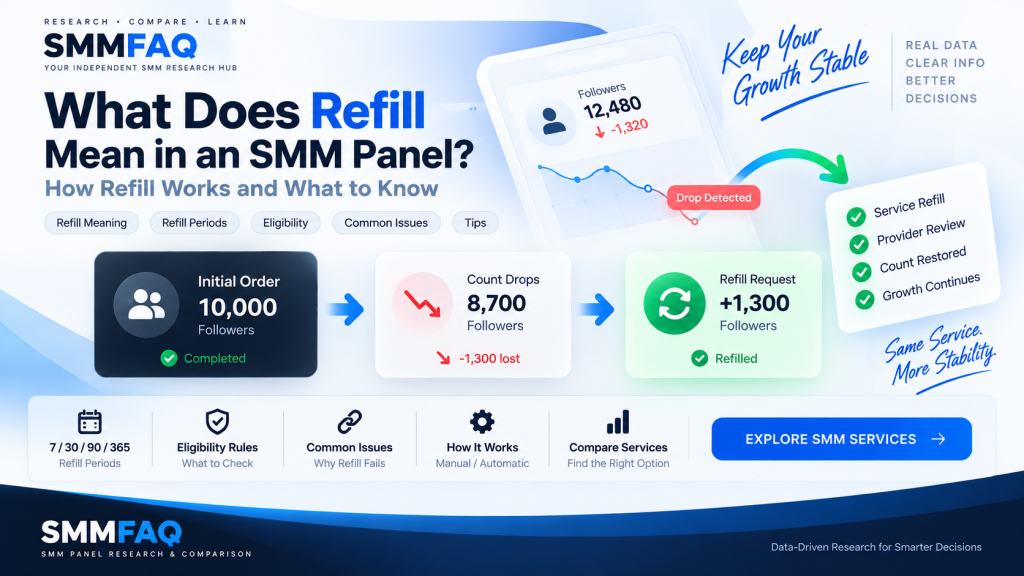
Refill in an SMM panel means that an eligible service may replace some of the delivered quantity if the count drops after an order is completed.
For example, suppose a user orders 10,000 followers and the delivered count later falls.
If the service includes refill support and the order still meets the provider’s refill conditions, a refill request may be used to restore part of that lost quantity.
But refill is not the same as a permanent guarantee.
The exact rules can depend on:
- the provider,
- the service,
- the refill period,
- the starting count,
- the current account status,
- previous orders on the same link,
- and the reason the count changed.
This is why “Refill: Yes” should be treated as a service feature rather than a promise that every future drop will always be replaced.
If you are new to SMM terminology, start with What Is an SMM Panel? before continuing.
What Does Refill Mean in an SMM Panel?
In SMM services, refill generally refers to replacing eligible losses after delivery.
A simple example:
Order quantity: 10,000
Delivered: 10,000
Later count: 8,700
Possible drop: 1,300
If the service has refill support, the provider may review whether that drop qualifies for replacement.
The provider could then send additional quantity to compensate for some or all of the eligible loss.
However, the system does not always work as simply as:
Drop = automatic refillProviders can apply their own conditions.
Why Do SMM Services Drop?
Social media counts can change for many reasons.
Followers, likes, views, members, reactions or other metrics may decrease because of:
- platform removals,
- inactive accounts,
- deleted accounts,
- account restrictions,
- service instability,
- natural user activity,
- profile changes,
- duplicate orders,
- or platform updates.
Some changes may also be unrelated to the SMM order.
For example, a user can lose existing followers naturally while a service is running.
This makes it difficult to assume that every numerical decrease comes entirely from one order.
What Is a Refill Period?
The refill period is the time window during which eligible refill requests can normally be made.
Common labels include:
7 Days Refill
15 Days Refill
30 Days Refill
60 Days Refill
90 Days Refill
365 Days Refill
Lifetime Refill
For example, a 30-day refill service generally means that refill eligibility exists for a stated period around 30 days after the relevant order event.
But providers may calculate the period differently.
It could begin from:
- order creation,
- order completion,
- or another internal timestamp.
Because refill terminology is not completely standardized, the provider’s current terms remain important.
What Does 30-Day Refill Mean?
A 30-day refill normally indicates that the provider offers refill coverage for an eligible period of approximately 30 days.
Suppose an order completes on September 1.
A provider may allow qualifying refill requests until around October 1.
That does not necessarily mean the service will be monitored every second for 30 days.
It may mean that a user can submit refill requests during that period.
The provider then checks whether the order still meets the refill conditions.
Does Refill Happen Automatically?
Sometimes.
Some providers support automatic refill, while others require the user or reseller to request it.
There are several possible models.
Manual Refill
A user opens the order and clicks a refill button or contacts support.
API Refill
A reseller sends a refill request through the provider’s API.
Automatic Refill
The provider system periodically monitors eligible orders and attempts to replace qualifying drops automatically.
The specific workflow depends on the provider.
You can learn more about automated provider communication in What Is an SMM Panel API?.
How Does an SMM Panel Refill Request Work?
A simplified workflow could look like this:
Customer notices a drop
↓
Customer requests refill
↓
Panel checks order
↓
Panel sends refill request
↓
Provider reviews eligibility
↓
Refill accepted or rejected
If the panel is connected to an upstream provider through an API, much of this process can happen automatically.
The customer may only see a Refill button.
Behind that button, the panel may be sending the original provider order ID to another system.
What Is a Refill API?
A refill API allows an SMM panel to send a refill request programmatically.
A reseller may have:
Local Order ID: 185432
Provider Order ID: 9832441
When the customer requests refill on order 185432, the reseller can send provider order 9832441 to the upstream API.
A response might indicate:
Refill submittedor:
Refill not eligibleThe exact response format varies.
Having a refill API makes the process easier to automate, but it does not remove the provider’s eligibility rules.
What Makes an Order Eligible for Refill?
Eligibility depends on the service.
Common conditions may include:
- the order is completed,
- the refill period has not expired,
- the account remains public,
- the username has not changed,
- the original link still works,
- the starting count is still verifiable,
- no conflicting orders have been placed,
- and the account has not fallen below certain expected levels.
These rules are provider-specific.
A service can display Refill: Yes while still rejecting an individual request that does not meet the conditions.
Why Can a Refill Request Be Rejected?
There are several common reasons.
The Refill Period Expired
A 30-day service cannot normally be expected to provide refill indefinitely.
The Account Became Private
The provider may no longer be able to inspect the account.
The Username Changed
Changing a username can break the relationship between the original order and the current profile.
The Post or Account Was Deleted
If the target link no longer exists, refill verification may be impossible.
Another Order Was Placed on the Same Link
Multiple overlapping orders can make it difficult to determine which service caused a particular increase or drop.
The Count Fell Below the Original Start Count
Some providers only refill losses associated with their own delivered amount.
The Order Is Still Processing
Some services only accept refill requests after completion.
The Provider Has Different Refill Rules
A service may have additional conditions that are not visible from the short service name alone.
Why Is Start Count Important for Refill?
Start count is the number recorded when an order begins.
Example:
Follower count before order:
20,000

Order:
5,000

Expected completed count:
Approximately 25,000
Now suppose the profile later shows:
19,500The current count is below the original 20,000 start count.
A provider may conclude that the loss includes followers that existed before the order.
In that situation, refill calculations become more complicated.
This is one reason start count is an important operational field.
Can Refill Restore the Account Above Start Count?
It depends on provider logic.
A provider may calculate an eligible drop based only on the delivered portion.
Suppose:
Start count: 10,000
Order: 5,000
Completed count: 15,000
Current count: 13,500
The observed drop is:
1,500That may be relatively straightforward.
But if the current count becomes:
8,000the profile is now below the original start count.
The provider cannot necessarily assume that all 7,000 lost followers belong to the 5,000-follower order.
What Is Refill Start Count?
Some systems record counts specifically to help determine whether a refill request is valid.
The provider may compare:
Original start count
Order quantity
Delivered count
Current count
and calculate whether the current difference falls within the covered amount.
Different providers can use different logic.
This is why two refill services can respond differently to the same situation.
What Does “No Refill” Mean?
No refill means that the service does not include a stated refill mechanism.
If the delivered quantity later drops, the provider may not replace the lost amount.
No-refill services are often cheaper, but not always.
For example:
| Service | Price | Refill |
|---|---|---|
| Service A | $0.40 / 1K | No |
| Service B | $0.65 / 1K | 30 days |
| Service C | $0.92 / 1K | 90 days |
Price can be influenced by many factors beyond refill.
You can read more about this in Why Do SMM Panel Prices Differ?.
Does Refill Mean the Service Will Never Drop?
No.
Refill support does not mean that the service cannot drop.
It means the service may include a mechanism for replacing eligible losses.
These are different concepts.
A service could drop several times and still qualify for refill during the coverage period.
Another service may experience very little loss but have no refill support at all.
Therefore:
Refill availability and retention are related concepts, but they are not identical.
Does Refill Guarantee Quality?
No.
A refill flag is one observable service feature.
It does not independently prove:
- account quality,
- retention,
- delivery speed,
- source,
- safety,
- authenticity,
- or long-term stability.
When comparing services, refill should be considered alongside other information such as:
- provider,
- price,
- minimum,
- maximum,
- cancel support,
- service description,
- and update time.
This is the same principle SMMFAQ uses in its service comparison database.
Is Longer Refill Always Better?
Not necessarily.
Consider:
Service A
30-day refill
$0.60 / 1K
and:
Service B
365-day refill
$1.40 / 1K
The longer refill period is one difference.
But there may also be differences in:
- provider,
- account source,
- delivery method,
- maximum order,
- start time,
- pricing,
- or eligibility rules.
A longer period can be useful, but it should not be interpreted as an overall quality score.
What Does Lifetime Refill Mean?
Lifetime refill is a label used by some providers to indicate refill coverage without a short fixed period.
However, “lifetime” should not automatically be interpreted as a literal permanent guarantee.
The service itself may later:
- be discontinued,
- become unavailable,
- change provider,
- lose refill support,
- or be affected by platform changes.
The provider’s current terms remain important.
For research purposes, Lifetime Refill should be treated as a provider-defined service label rather than a universal industry standard.
Can Lifetime Refill Stop Working?
Yes.
A service could initially offer lifetime refill and later become unavailable.
For example:
Provider removes service
Underlying source closes
Platform changes
Provider account changes
Service becomes technically unavailable
A provider may also revise its rules.
Therefore, lifetime refill should not be understood as an absolute technical guarantee that can never end.
Refill vs Guarantee: Are They the Same?
The terms are sometimes used together, but they should not always be treated as identical.
A service description might say:
30 Days Refillwhile another says:
30 Days GuaranteeSome panels may use these phrases interchangeably.
Others may define them differently.
Because SMM terminology is not globally standardized, the actual service description and provider rules matter more than the wording alone.
Refill vs Replacement
These concepts are closely related.
Refill generally describes restoring losses after delivery.
Replacement can be used more broadly to describe supplying additional quantity when the original delivery falls below the expected level.
In many SMM panels, both concepts are effectively handled through the same refill process.
Refill vs Partial
A partial order and a refill are different.
Suppose a customer orders:
10,000but the provider can only deliver:
7,500The remaining:
2,500may result in a partial status.
That is an incomplete initial delivery.
Refill, on the other hand, usually concerns a drop that happens after delivery.
So:
Partial = initial order not fully delivered
Refill = previously delivered quantity later decreased
Does a Partial Order Qualify for Refill?
Not automatically.
A partial order may already have been financially adjusted for the undelivered amount.
The completed portion could still have its own refill rules, depending on the provider.
Again, this varies by service.
Can You Refill an Order That Is Still In Progress?
Usually not.
Many providers require an order to reach a final status before refill becomes available.
For example:
Pending
Processing
In Progress
Completed
A refill button may only appear after Completed.
This prevents the system from confusing unfinished delivery with an actual post-completion drop.
Why Multiple Orders on the Same Link Can Cause Refill Problems
Suppose a user places:
Order A: 5,000 followersand before Order A finishes, places:
Order B: 10,000 followerson the same profile.
Now both orders are affecting the same count.
If the profile later drops, it may be difficult to determine which order should be refilled.
This can create issues with:
- start counts,
- delivered amounts,
- refill calculations,
- and provider eligibility.
For this reason, many providers recommend waiting for an existing order to finish before submitting another similar order to the same link.
Can Changing a Username Affect Refill?
Yes.
A username change can make it harder for the provider to verify the original target.
For example:
Original:
instagram.com/oldusername

Later:
instagram.com/newusername
Even if both URLs belong to the same account, the provider’s system may still be tracking the original link.
Some providers explicitly exclude username changes from refill coverage.
Can Private Accounts Receive Refill?
It depends on the provider, but private accounts can create verification problems.
A provider may need to inspect:
- follower count,
- post information,
- account availability,
- or other public data.
If the account becomes private, that information may no longer be accessible.
As a result, a refill request can be delayed or rejected.
Can Deleted Posts Receive Refill?
Generally, no.
If the service targeted a post and the post no longer exists, the provider cannot normally restore engagement to that deleted target.
The same issue can apply to:
- deleted videos,
- deleted channels,
- removed accounts,
- invalid usernames,
- or broken links.
How Long Does a Refill Take?
There is no universal refill speed.
A refill may begin:
- within minutes,
- within hours,
- within a day,
- or later.
Some requests require manual provider review.
Others are processed automatically.
Refill speed can also depend on the original service source.
A service being labelled refill-enabled does not guarantee instant refill.
Can Refill Be Requested More Than Once?
Some services allow multiple refill requests during the coverage period.
Example:
Day 5 → Refill requested
Day 14 → Another eligible drop
Day 14 → Second refill requested
Other providers may impose limits or waiting periods between refill requests.
The service’s own rules determine this behavior.
Can a Provider Change Refill Terms?
Yes.
Provider catalogs change.
A service could originally be listed as:
30 Days Refilland later become:
No RefillThe provider could also remove the service completely.
This is why synchronized service data should include an update date where possible.
SMMFAQ treats provider catalog information as time-sensitive research data rather than permanent specifications.
Does a More Expensive Service Usually Have Better Refill?
Not necessarily.
Price and refill are separate comparison fields.
A service could be expensive because of:
- targeting,
- supply source,
- markup,
- maximum quantity,
- provider costs,
- or another feature.
A cheaper service may still have refill.
Likewise, an expensive service may have no refill at all.
See Why Do SMM Panel Prices Differ? for a detailed explanation of pricing factors.
How Should You Compare Refill Services?
Rather than checking only whether refill says Yes, compare the complete service information.
Refill Period
How long is the stated coverage?
Provider
Which provider supplies the service?
Price
How much does the service cost per 1,000?
Minimum and Maximum
What order sizes are supported?
Cancel
Does the service also support eligible cancellation?
Service Description
Are there special refill conditions?
Updated Date
How recently was the service information synchronized?
You can compare these fields directly through the SMMFAQ Services Database.
How SMMFAQ Displays Refill Data
Where provider catalog information includes refill support, SMMFAQ can display it as a separate comparison field.
For example:
| Provider | Price / 1K | Min / Max | Refill | Cancel |
|---|---|---|---|---|
| Provider A | $0.42 | 100 / 10K | No | No |
| Provider B | $0.68 | 50 / 100K | Yes | Yes |
| Provider C | $0.91 | 100 / 1M | Yes | Yes |
The table makes refill easier to compare with other observable fields.
But SMMFAQ does not convert Refill: Yes into an overall service-quality score.
Provider conditions can still differ.
For broader company context, you can also review the SMMFAQ Provider Directory.
Final Thoughts
Refill in an SMM panel is a mechanism for replacing eligible losses after a service has been delivered.
It can be useful, but it has limits.
Refill eligibility may depend on:
- the service period,
- order status,
- start count,
- account visibility,
- username changes,
- duplicate orders,
- provider rules,
- and whether the target still exists.
A label such as 30 Days Refill or Lifetime Refill should therefore be read as part of the service description, not as an unlimited guarantee.
For comparison, look at refill together with price, provider, minimum, maximum, cancel support and update time.
You can research current service fields in the SMMFAQ Services Database and learn more about the companies behind the catalogs in the Provider Research Directory.
Frequently Asked Questions
What does refill mean in an SMM panel?
Refill means that an eligible service may replace some quantity that drops after delivery, subject to the provider’s refill rules.
What does 30-day refill mean?
It generally means the service provides a refill window of approximately 30 days according to the provider’s terms.
Is SMM refill automatic?
Some services support automatic refill, while others require a manual button, support request or API refill request.
Does refill mean followers will never drop?
No. A refill service can still experience drops. Refill describes a replacement mechanism, not guaranteed permanent retention.
What does lifetime refill mean?
Lifetime refill is a provider-defined label generally used for refill coverage without a short fixed period. It should not be interpreted as an absolute permanent guarantee.
Why was my refill request rejected?
Possible reasons include an expired refill period, username change, private account, invalid link, overlapping orders, start-count issues or provider-specific eligibility rules.
Can I request refill more than once?
Some providers allow multiple refill requests during the coverage period. Others may impose limits or waiting periods.
Can I refill an order that is still processing?
Usually refill becomes available after an order reaches a final status such as Completed, although provider rules vary.
Does a more expensive service have better refill?
Not necessarily. Price and refill are separate fields and can be affected by different factors.
Where can I compare SMM services with refill?
You can compare provider, price, min/max, refill, cancel and update information in the SMMFAQ Services Database.