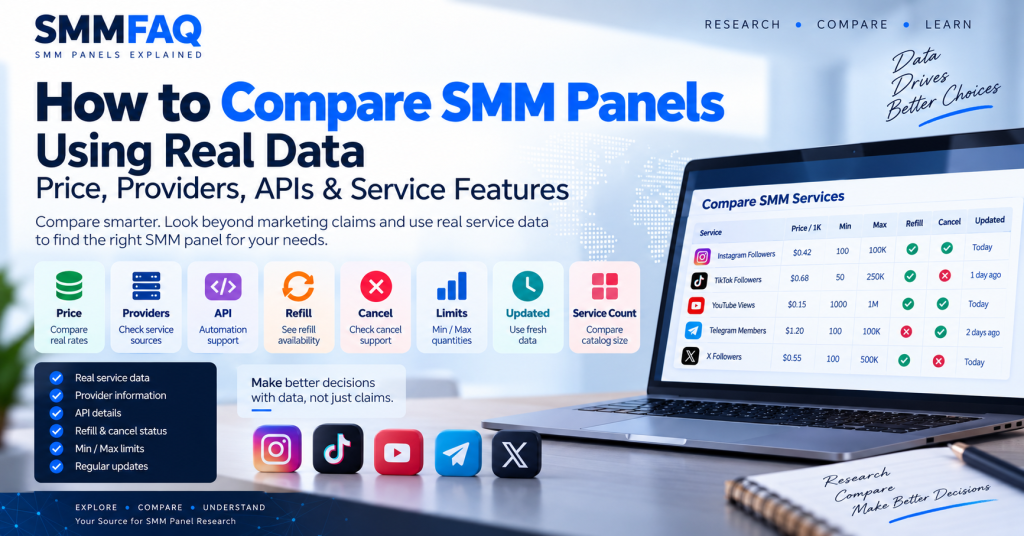
Comparing SMM panels is more useful when the comparison is based on observable data instead of marketing claims.
A panel may describe itself as the cheapest, fastest, most reliable, or a main provider.
Those phrases can be useful clues, but they are not enough on their own.
A stronger comparison looks at measurable fields such as:
- service price,
- provider,
- minimum and maximum quantity,
- refill support,
- cancel support,
- API availability,
- service count,
- update date,
- platform coverage,
- and provider profile information.
The key question is not:
Which SMM panel sounds better?
A better question is:
Which panel has the service characteristics that match the comparison you are trying to make?
If you are new to the industry, start with What Is an SMM Panel? before using a comparison framework.
What Should You Compare Between SMM Panels?
The most useful SMM panel comparison starts with the service level.
Two panels can look very different as websites while selling similar upstream services.
At the same time, two panels that look almost identical can have very different providers, prices and service conditions.
Useful comparison fields include:
| Field | Why It Matters |
|---|---|
| Price / 1K | Shows the current listed rate |
| Provider | Adds supply-chain context |
| Min / Max | Shows usable order range |
| Refill | Indicates refill availability |
| Cancel | Shows whether eligible orders may be stopped |
| API | Indicates automation support |
| Updated | Helps judge data freshness |
| Service Count | Shows catalog breadth |
| Platforms | Shows coverage |
| Provider Profile | Adds broader research context |
These fields do not create one universal winner.
They help answer different questions.
1. Compare the Exact Service, Not Just the Panel
A common mistake is comparing entire panels using one service.
For example:
Panel A:
Instagram Followers — $0.40 / 1K

Panel B:
Instagram Followers — $0.75 / 1K
That does not automatically mean Panel A is cheaper overall.
Panel B could have lower prices for:
- TikTok,
- YouTube,
- Telegram,
- or another Instagram category.
A panel comparison should therefore begin with the exact service type being researched.
The SMMFAQ Services Database is designed around this service-level comparison approach.
2. Compare Price, but Do Not Stop at Price
Price is useful.
It is also one of the easiest fields to misunderstand.
Imagine three services:
| Service | Price / 1K |
|---|---|
| Service A | $0.42 |
| Service B | $0.68 |
| Service C | $0.95 |
If the only goal is to identify the lowest displayed rate, Service A is the answer to that narrow question.
But that table does not tell you:
- the provider,
- refill,
- cancel,
- maximum quantity,
- service source,
- or when the rate was last updated.
That is why SMMFAQ treats price as one field rather than an overall quality score.
For a deeper explanation, read Why Do SMM Panel Prices Differ?.
3. Check the Provider Behind the Service
Provider context can explain why similar services behave differently.
A panel may:
- operate some services itself,
- use one upstream provider,
- use many providers,
- act as a reseller,
- or combine several service sources.
The customer-facing panel is not always the same company that fulfills the order.
This matters because provider changes can affect:
- price,
- refill,
- cancel,
- delivery behavior,
- and service availability.
You can research provider-level information in the SMMFAQ Provider Directory.
For supply-chain context, see How Do SMM Panels Get Their Services?.
4. Compare Minimum and Maximum Quantities
A cheap service may not support the quantity you need.
Example:
Service A
Price: $0.40 / 1K
Min: 100
Max: 10,000
Service B
Price: $0.55 / 1K
Min: 50
Max: 1,000,000Service A has the lower rate.
Service B supports a much larger order.
Which one is more suitable depends on the use case.
This is why Min / Max should be compared alongside price.
5. Check Refill Support
Refill support can matter when comparing similar services.
For example:
Service A
$0.45 / 1K
Refill: No
Service B
$0.62 / 1K
Refill: YesThe price difference may partly reflect different service conditions.
But refill should not be treated as a quality guarantee.
A service marked Refill: Yes can still have eligibility rules.
For details, read What Does Refill Mean in an SMM Panel?.
6. Compare Cancel Support
Cancel support is another useful service field.
A cancel-enabled service may allow an eligible active order to be stopped before the full quantity is delivered.
This can be useful when:
- the wrong quantity was entered,
- the order is no longer needed,
- the target changed,
- or processing conditions changed.
But Cancel: Yes does not mean instant cancellation is guaranteed.
The provider still controls eligibility and processing.
See What Does Cancel Mean in an SMM Panel? for the full explanation.
7. Check the Update Date
SMM service data is time-sensitive.
A service listed at:
$0.40 / 1Ktoday could be:
$0.65 / 1Klater.
The provider may also change:
- minimum,
- maximum,
- refill,
- cancel,
- service name,
- or availability.
That makes the Updated field important.
A comparison based on recent synchronized data is generally more useful than one based on an old screenshot or outdated blog post.
8. Compare API Availability
For API users, automation capability can be important.
An SMM panel API can allow software to:
- retrieve services,
- place orders,
- check status,
- request refill,
- request cancellation,
- and read account balance.
But API availability does not prove that a panel is the original service source.
A reseller can also operate a full API.
For technical details, see What Is an SMM Panel API?.
9. Look at the Service Catalog Size Carefully
Catalog size can show how broad a panel is.
For example:
Panel A:
1,200 services

Panel B:
8,500 services
Panel B clearly lists more services.
But a larger catalog does not automatically mean better services.
The larger panel may:
- aggregate several providers,
- include many duplicate categories,
- keep inactive listings,
- or cover more platforms.
Catalog size is useful context, not a quality score.
10. Compare Platform Coverage
Some panels focus heavily on one platform.
Others spread their catalogs across many platforms.
For example:
Panel A
Instagram-heavy

Panel B
Telegram-heavy

Panel C
Broad multi-platform catalog
A user researching Telegram services may care more about Panel B than about which panel has the largest total catalog.
This is why provider profile fields such as platform coverage can be useful.
11. Do Not Treat Marketing Labels as Technical Standards
SMM service names often contain terms such as:
- premium,
- real,
- HQ,
- stable,
- fastest,
- non-drop,
- main provider,
- direct source.
These terms are not standardized across the industry.
One provider’s Premium service may not be comparable to another provider’s Premium service.
A better comparison uses measurable fields.
For example:
Price
Min
Max
Refill
Cancel
Provider
Updated
rather than relying only on the adjective in the service title.
12. Compare Similar Services, Not Just Similar Names
Two services can have the same name and still be different.
Example:
Instagram Followersmay refer to:
- different providers,
- different account sources,
- different refill conditions,
- different geographic targeting,
- different maximum quantities,
- or different delivery systems.
The reverse is also possible.
Two differently named services may share the same upstream source.
This is why name matching alone is not enough.
14. Compare Provider Profiles, Not Only Service Rows
A service row gives detailed information about one listing.
A provider profile gives wider context.
A useful provider profile may contain:
- website,
- API availability,
- synchronized service count,
- platform coverage,
- service catalog,
- update information,
- and research notes.
This makes it easier to move from:
Service
↓
Provider
↓
Provider Catalog
rather than looking at a single isolated price.
Browse profiles in the SMMFAQ Provider Directory.
15. Understand the Difference Between Provider and Reseller
A panel can sell services without being the original source.
That is normal in reseller-based systems.
A reseller can still have:
- thousands of services,
- an API,
- automatic status updates,
- refill,
- cancel,
- and API customers.
The difference concerns where the service comes from.
For a complete explanation, read What Is an SMM Panel Provider?.
16. Consider Supply-Chain Depth
A service can move through several systems.
Example:
Service Source
↓
Provider
↓
Aggregator
↓
Reseller
↓
Customer
More layers can influence:
- pricing,
- support speed,
- status synchronization,
- and refill/cancel handling.
But a longer chain does not automatically mean a bad service.
It simply creates more dependencies.
17. Compare Service Status Features
Service listings can expose operational features beyond price.
For example:
Refill: Yes
Cancel: Yes
or:
Refill: No
Cancel: No
These fields can change how an order is managed after submission.
A useful comparison table therefore includes them separately instead of combining everything into one vague quality label.
18. Look at Partial-Order Context
Orders do not always complete fully.
A provider may deliver only part of the quantity and finalize the rest as Partial.
Understanding this status can help when comparing order behavior and support expectations.
For details, see What Does Partial Mean in an SMM Panel?.
19. Compare Similar Time Periods
Do not compare:
Panel A price from todaywith:
Panel B price from six months agoand treat them as a current comparison.
SMM prices and catalog conditions can change quickly.
The best comparison uses data from approximately the same time period.
20. Avoid Using One Order as Proof of Overall Quality
One successful order does not prove that every service from a provider will behave the same way.
One failed order does not prove that every service is poor either.
A panel can have:
- strong Instagram services,
- weak Telegram services,
- unstable YouTube services,
- and competitive TikTok pricing
at the same time.
Service-level evidence is more useful than generalizing from a single order.
What Data Is Most Useful When Comparing SMM Panels?
A practical comparison can start with this structure:
| Comparison Field | What It Tells You |
|---|---|
| Provider | Who supplies the listing |
| Service | What is being offered |
| Price / 1K | Current listed cost |
| Min / Max | Order range |
| Refill | Refill support |
| Cancel | Cancellation support |
| Updated | Data freshness |
| API | Automation capability |
| Platform | Catalog focus |
| Service Count | Catalog breadth |
These fields are observable.
Claims such as:
Best
Highest Quality
Safest
Number One
require a much broader methodology before they can be treated as conclusions.
Example: Comparing Three SMM Services
Consider these three services:
| Field | Service A | Service B | Service C |
|---|---|---|---|
| Price / 1K | $0.40 | $0.61 | $0.88 |
| Min | 100 | 50 | 100 |
| Max | 10K | 250K | 1M |
| Refill | No | Yes | Yes |
| Cancel | No | Yes | Yes |
| Updated | Today | Today | 2 days ago |
What can we conclude?
Service A has the lowest displayed rate.
That is a factual comparison.
Service C has the largest maximum.
That is also factual.
Services B and C list refill and cancel support.
Again, factual.
But the table alone cannot establish:
Service C is the best.
That would require a definition of best and additional evidence.
This distinction is central to data-driven SMM research.
How to Compare Two SMM Panels Step by Step
A simple workflow is:
Step 1: Choose the Exact Service Type
For example:
Instagram FollowersStep 2: Search the Service Database
Use the SMMFAQ Services Database to find relevant listings.
Step 3: Compare Price
Identify the current rates.
Step 4: Compare Min / Max
Make sure the services support comparable quantities.
Step 5: Compare Refill and Cancel
Check whether the features differ.
Step 6: Open the Provider Profiles
Use the SMMFAQ Provider Directory for broader provider context.
Step 7: Check Update Dates
Give more weight to current data.
Step 8: Read the Service Description
Look for provider-specific conditions.
Step 9: Avoid Assuming Similar Names Mean Identical Services
Compare the underlying fields.
Step 10: Make the Decision Based on the Fields That Matter to Your Use Case
There is no single comparison field that answers every question.
How SMMFAQ Approaches SMM Panel Comparison
SMMFAQ is structured around observable research data.
The aim is not to assign a universal score to every provider.
Instead, the platform makes it easier to compare fields such as:
- price,
- provider,
- service ID,
- category,
- min/max,
- refill,
- cancel,
- and update time.
Provider profiles add another layer of context.
This structure is useful because different users may value different fields.
A developer may care about API availability.
A researcher may care about provider relationships.
Someone comparing large orders may care about maximum quantity.
A user comparing pricing may focus on rate per 1K.
The same dataset can answer different questions without pretending that one provider is automatically best for everyone.
What Should You Not Use as the Only Comparison Signal?
Avoid relying on any one of these alone:
Cheapest Price
It does not describe the full service.
Largest Catalog
It does not prove service quality.
Main Provider Label
It is not a standardized certification.
Premium Label
It has no universal technical definition.
API Availability
It does not prove service ownership.
One Successful Order
It does not represent the whole catalog.
One Negative Order
It does not automatically represent the whole provider either.
A stronger comparison combines several fields.
Why Data Freshness Matters More in SMM Than in Many Other Niches
SMM catalogs can change rapidly.
A provider can:
- remove a service,
- add a new one,
- change rate,
- reduce max quantity,
- remove refill,
- add cancel,
- or switch service source.
That means an old list of “best SMM panels” can become inaccurate quickly.
A data-driven research site should therefore show when information was updated whenever possible.
Can You Compare SMM Panels Only by Their Websites?
Not reliably.
Website design can tell you about presentation and usability.
It does not necessarily reveal:
- actual provider source,
- service quality,
- API structure,
- catalog freshness,
- or upstream relationships.
A professionally designed panel can be a reseller.
A simple-looking panel can be an upstream supplier.
The visual appearance alone is not enough.
Is the Cheapest SMM Panel the Best Choice?
There is no universal answer because best depends on the criterion.
If the only criterion is the lowest current displayed price for one comparable service, the lowest rate can be identified objectively.
But that does not automatically answer questions about:
- refill,
- cancel,
- maximum quantity,
- delivery behavior,
- provider,
- or support.
A more accurate question is:
Which service currently has the lowest rate among listings that meet my required conditions?
That is a measurable comparison.
Can SMMFAQ Tell You Which Panel to Choose?
SMMFAQ can provide structured information to support comparison.
It can show:
- current synchronized service records,
- provider information,
- pricing,
- limits,
- refill,
- cancel,
- and update context.
The final choice depends on which fields matter to the user.
This avoids turning a research database into an unsupported ranking system.
Final Thoughts
A useful SMM panel comparison should be based on real, observable fields.
Price matters.
But so do:
- provider,
- minimum,
- maximum,
- refill,
- cancel,
- API,
- service count,
- platform coverage,
- and update date.
The most important principle is simple:
Compare the field that answers your actual question.
If the question is price, compare price.
If the question is maximum quantity, compare max limits.
If the question is refill support, compare refill.
If the question is provider context, compare provider profiles.
This produces a more accurate result than trying to reduce every panel to one overall “best” label.
Start with the SMMFAQ Services Database for service-level comparison and use the SMMFAQ Provider Directory for broader provider research.
For more background, read How Do SMM Panels Get Their Services?, What Is an SMM Panel Provider?, and What Is an SMM Panel API?.
Frequently Asked Questions
How do you compare SMM panels?
Compare specific services using measurable fields such as price, provider, minimum, maximum, refill, cancel, API availability and update date.
What is the most important SMM panel comparison factor?
There is no single factor for every use case. The most important field depends on whether you are comparing price, limits, provider context, refill, cancel or automation.
Should I choose the cheapest SMM panel?
The cheapest rate answers only a price question. Other fields such as provider, refill, cancel, limits and update date should also be checked.
Does a large service catalog mean a better SMM panel?
No. A large catalog shows greater breadth but does not automatically establish service quality.
Does an SMM API mean the panel is a provider?
No. Reseller panels can also operate APIs and forward orders to upstream providers.
What should I compare besides SMM panel price?
Useful fields include provider, minimum and maximum quantity, refill, cancel, API availability, service count, platform coverage and update date.
How can I compare SMM providers?
Use provider profiles together with service-level data. The SMMFAQ Provider Directory organizes provider context while the SMMFAQ Services Database shows individual catalog records.
Why does the update date matter?
SMM prices, limits, refill, cancel and service availability can change quickly, so recent synchronized data is generally more useful for current comparison.
Can two different SMM panels sell the same service?
Yes. Multiple panels can use the same upstream provider while renaming the service and applying different pricing.
Does SMMFAQ rank SMM panels?
SMMFAQ focuses on structured comparison fields rather than presenting directory position as an overall provider ranking.